
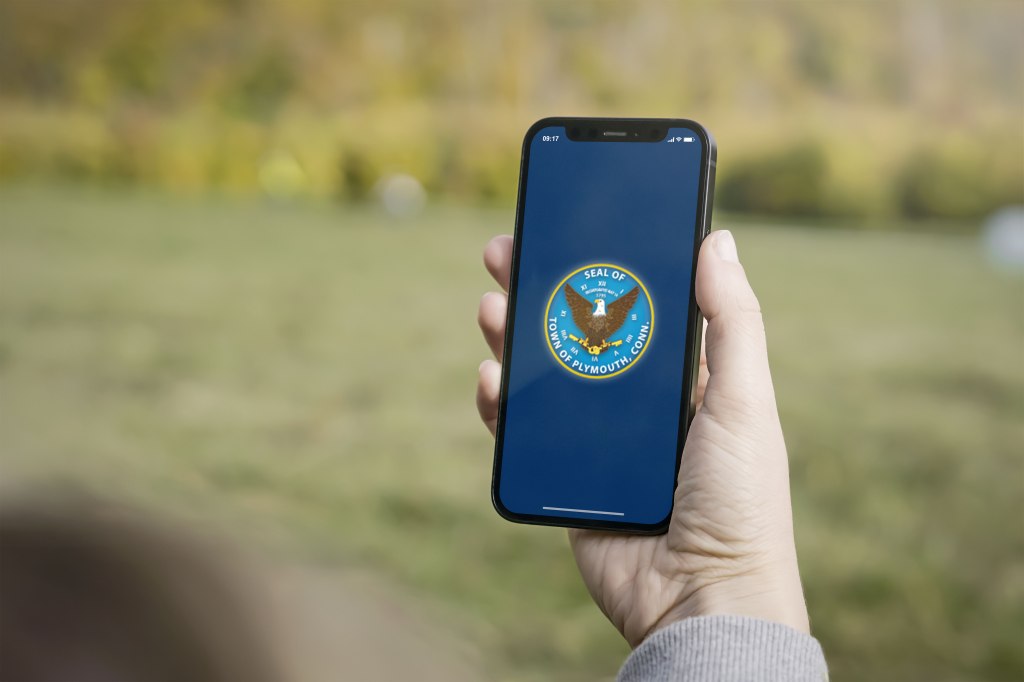
As towns and cities begin to better serve their communities in the digital age, companion apps have become a powerful tool to keep citizens informed and engaged. I was tasked with designing the Information Architecture (IA) of a mobile app that would act as a companion to the official town website for Plymouth, CT.
My goal wasn’t to replicate the website exactly, but rather to reimagine the user experience through the medium of a mobile app. An app’s structure is different than a website since there is a heavy prioritization of quick actions and ease of use. Apps are great when they’re intuitive and focused and that’s what was the guide for the decisions I made when creating my IA.

The Approach: User Centered and Task Oriented
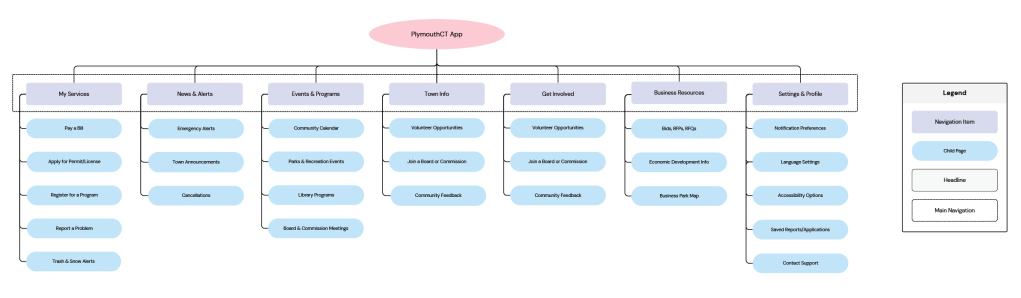
When planning the IA for the PlymouthCT app, I began my identifying the primary needs of the users who are most likely to access municipal information on the go. These are people who want to complete specific tasks quickly and not necessarily read through dense pages of government material. With that, I grouped key actions and information into five main categories, each designed to serve a distinct user need:
My Services
This section focuses on the most common tasks that residents are often looking for:
- Pay a Bill (i.e. taxes and utilities)
- Apply for a Permit of License (i.e. building, event, pet, etc.)
- Register for a Program (i.e. youth sports, adult classes, etc.)
- Report a Problem (i.e. potholes, vandalism, noise complaints, etc.)
By keeping these services under one category, users can quickly find and complete transactional tasks without having to navigate deep. These actions will be native to the app, but when necessary, they can link to portals using WebView for seamless access without leaving the app.
News & Alerts
In this section, I included:
- Town Announcements
- Emergency Alerts
- Cancellations
- Trash & Snow Alerts
The purpose of this section is to keep users informed of the latest updates that may affect their daily lives. Whether it’s a weather related cancellation or a major update, this category will support push notifications and custom notification preferences. The idea is to turn the app into an information hub, which is something the town website can’t do as rapidly.
Events & Programs
Community engagement is very important to small towns like Plymouth. This category makes it easy for residents and and businesses to stay in the loop:
- Community Calendar
- Parks & Recreation Events
- Library Programs
These listings will be optimized for easy interaction allowing users to RSVP, add events to their calendar, or share them with others. Events will be filterable by interest or department to make it easier for residents to find what they are looking for.
Town Info
While the deeper civic content lives on the website, the app will provide a summarized and accessible overview of:
- Boards & Commission Meetings
- Volunteer Opportunities
- Business Resources
- Economic Development Info
This section balances both keeping people informed and not overloading the app’s interface. When needed, links to detailed resources will open in a WebView format in order to reduce the need to recreate complex pages and also maintain a cohesive user experience.
Settings & Profile
Finally, the app includes a settings area to help users tailor their experience:
- Notification Preferences
- Language Settings
- Accessibility Options
- Saved Reports/Applications
- Contact Support
This section ensures that the app is inclusive and customizable. Whether someone needs to view the app in a larger font or receive alerts in another language, these options support all residents of the community.
Why Not Just Copy the Website?
One of the core challenges in designing this IA was deciding what to include natively in the app and what to leave on the website. Rather than duplicating the entire site, I made the decision to focus on task based features and time sensitive information. Mobile users want to be able to take action and not sift through tons of content.
To bridge the gap, the app will also take advantage of WebView functionality for resources like PDF documents, meeting minutes, or complex licensing instructions. This allows the town to maintain one up to date version of the content while also making it accessible through the app’s interface.
Final Thoughts: Building for Real World Use
When designing this IA, I tried to think like a resident of Plymouth – someone who is juggling family life, staying informed about town news, and participating in community events. The result is a structure that is practical and action focused that makes interaction with the municipal government easier.
Ultimately, the PlymouthCT app is not a scaled down website, but a companion tool designed to be with people on the go when they have limited time and need answers fast. This IA supports that vision and lays a foundation for a user experience that is meaningful and efficient for community service.




 Pixel + Parchment
Leave a comment