
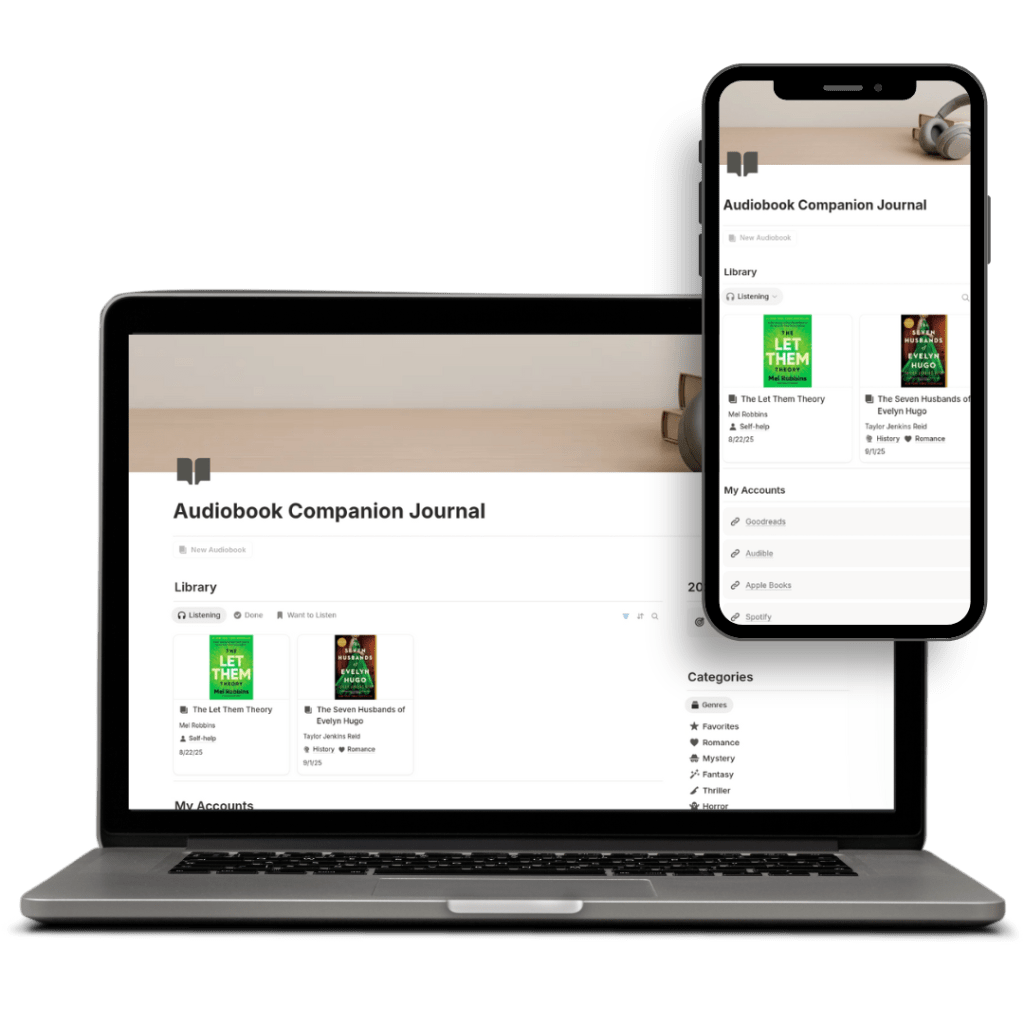
A Notion dashboard designed to help audiobook listeners capture insights and turn them into action.
Role
Product Designer & Researcher
Timeline
September 8, 2025 – September 28, 2025
Tools Used
Notion, Canva, Gumroad
Built for curious learners and self-development enthusiasts who listen to audiobooks regularly and want to retain and apply key lessons without losing track of what they’ve learned.
The Problem
“After I finish an audiobook, I forget 90% of it a week later.”
“I take tons of notes but never revisit them.”
“I wish I had a structured way to turn insights into action steps.”
Many audiobook listeners, whether they enjoy self-development titles, memoirs, or immersive fiction, struggle to stay engaged with and remember what they’ve heard. After finishing a book, it’s easy to forget favorite moments, meaningful quotes, or ideas worth revisiting. Existing tools often focus on tracking progress rather than capturing reflections, leaving listeners without a simple way to organize their thoughts or document takeaways. I wanted to solve this by creating a structured yet flexible space for audiobook fans to record insights, emotions, and story details and help them build a more intentional and lasting connection to what they listen to.
Research Phase
For this project, I explored digital product opportunities at the intersection of reading, productivity, and community. My research revealed that while digital reading journals are abundant, they often overwhelm users with too many features and lack strong support for audiobook listeners. The audiobook market, projected to grow from $6.96B in 2024 to $13.08B by 2030, shows clear demand yet little innovation in companion tools. Most Notion and PDF journals focus on written books, leaving a gap for listeners who want to capture quotes, reflections, and timestamps in a structured way. Through competitor analysis and user observation, I identified an unmet need for a lightweight, flexible, and aesthetically pleasing template that helps both casual and committed audiobook fans remember what they listen to and connect more deeply with the stories. This insight shaped my decision to develop the Audiobook Companion Journal Template as my final product.
Build Process: Week 1
In Week 1, I dove into building the foundational components of the Audiobook Companion Journal in Notion. My main focus was creating the “new audiobook” logging template—including sections for timestamps, favorite quotes, key takeaways, overall summaries, and book metadata—and a genre-specific page that lets users view logged books in a gallery filtered by genre. I also began sketching the main hub page where all parts of the journal will assemble. Although I felt I was only about 30–40% done, these core templates gave me momentum.
I leaned heavily on external support by watching YouTube tutorials and tapping ChatGPT especially when I hit roadblocks with Notion’s database functions. I had to redo work a few times, but eventually things started clicking. The biggest lesson of the week: getting started is often the hardest part, and pushing through early frustrations yields momentum.
Build Process: Week 2
In the “middle mile” of development, I pushed through the stage where excitement wears off and the real work becomes visible. I built the main hub page in Notion, the dashboard that ties all the pieces together, bringing the template to about 75-80% completion. This week involved a lot of wrestling with Notion’s databases and formulas and multiple rounds of trial and error. I even accidentally overwrote earlier components, but recovered them and kept going. While I didn’t run user tests yet because I felt the template wasn’t polished enough, I set goals to do that next week along with adding sample books, polish, and writing up product listings. This period felt messy and frustrating, but it was also deeply productive and the project really began to take shape.
Build Process: Week 3
By the end of development, the Audiobook Companion Journal template was fully built and polished. I added example books across genres so users opening the template can see real layouts in action, and designed a custom audiobook-themed header to elevate the visual presentation. I conducted two usability tests with audiobook enthusiast friends, asking them to log a book, filter by genre, and add a new title; their feedback was overwhelmingly positive. One suggested placing the summary section at the top for quicker access, but I decided to keep the flow of reflection to summary. Internally, I refined Notion formulas and user directions, and decided to launch first on the Notion Marketplace (given the product’s native ecosystem) rather than immediately listing on multiple platforms. The biggest challenge was deciding when to stop iterating and focusing on polish rather than expansion. With the product internally “100% complete,” I shifted into launch mode: writing product descriptions and preparing marketing visuals.
Marketing Plan and Product Launch
For launch week, I introduced the Audiobook Companion Journal Template to the public and officially released it for sale. The product was designed to help audiobook listeners capture notes, reflections, and favorite quotes while they listen, something existing reading journals rarely support. I originally planned to list it on the Notion Marketplace but discovered that becoming a seller requires an application process, so I pivoted to launch on Gumroad instead to make it immediately accessible. I priced it at $5 and promoted it through Reddit, LinkedIn, and Instagram, sharing visuals and walkthrough clips to connect with audiobook and productivity communities. The post marked the official transition from development to real-world sales — my first public product launch.
Conclusion
Developing the Audiobook Companion Journal Template was both a creative and strategic learning experience. It began as an exploration of gaps in the digital reading market and evolved into a focused solution for a growing audience of audiobook listeners who want to engage more deeply with what they hear. Through research, iteration, and user testing, I learned how to balance usability with design aesthetics and scope a product that feels intentional rather than overloaded. Transitioning from Notion’s seller application process to launching on Gumroad taught me to stay flexible and prioritize getting real feedback over waiting for the “perfect” platform. The project not only resulted in a functional, market-ready digital product but also gave me hands-on experience in end-to-end digital entrepreneurship—from research to launch day sales.




 Pixel + Parchment